Reference · BPMN 2.0
BPMN symbols and meanings: events, tasks, gateways, flows
In short
BPMN 2.0 (Business Process Model and Notation, an OMG standard) has four symbol families. Flow objects: events are circles (thin ring = start, double ring = intermediate, thick ring = end, with an icon for the trigger — envelope for message, clock for timer, lightning for error), activities are rounded rectangles (task, sub-process, call activity) and gateways are diamonds (X exclusive, + parallel, O inclusive, pentagon-in-circle event-based). Connecting objects: solid arrows are sequence flows inside a pool, dashed arrows with an open head are message flows between pools, dotted lines are associations. Swimlanes: pools for participants, lanes for roles inside a pool. Artifacts: data objects, data stores, groups and text annotations.
Updated · by the ChartCraft team · Simbol BPMN (Bahasa Indonesia)
What are the BPMN event symbols?
An event is something that happens during a process. The ring tells you when (start, intermediate, end) and the icon tells you what triggers it. For intermediate events a hollow icon means the process waits for the trigger (catching) and a filled icon means the process produces it (throwing). The matrix below follows the BPMN 2.0.2 specification (OMG formal/2013-12-09, table 10.93).
| Symbol | Trigger | Start | Intermediate (catch) | Intermediate (throw) | End | Meaning |
|---|---|---|---|---|---|---|
| None | ✓ | ✓ (untyped) | ✓ (untyped) | ✓ | Plain start, end or milestone with no specific trigger. The most common event in any diagram. | |
| Message | ✓ | ✓ | ✓ | ✓ | A message arrives from another participant (catch) or is sent to one (throw): "Order received", "Send quote". | |
| Timer | ✓ | ✓ | — | — | A point in time or a duration: "every Monday 08:00", "after 3 days". Often attached to a task as a deadline. | |
| Error | ✓ (event sub-process only) | ✓ (boundary only) | — | ✓ | A business error is raised (end) or handled (boundary). Always interrupts. | |
| Signal | ✓ | ✓ | ✓ | ✓ | A broadcast that any process can react to, unlike a message which has one addressee. | |
| Conditional | ✓ | ✓ | — | — | Fires when a condition becomes true: "stock below reorder level". | |
| Escalation | ✓ (event sub-process only) | ✓ (boundary only) | ✓ | ✓ | Hands the case up to a higher level without aborting the process (can be non-interrupting). | |
| Link | — | ✓ | ✓ | — | Off-page connector: a throwing link jumps to the catching link with the same name on the same level. | |
| Terminate | — | — | — | ✓ | Ends the whole process instance immediately, even if other paths are still active. | |
| Boundary event (interrupting) | — | ✓ | — | — | An intermediate event drawn on the border of an activity. When it fires, the activity is cancelled and the flow leaves via the event. | |
| Boundary event (non-interrupting) | ✓ (event sub-process) | ✓ | — | — | Dashed ring: the event starts a parallel path and the activity keeps running — a reminder, not a cancellation. |
Other triggers in the spec: compensation (rewind arrows), cancel (X, transactions only) and multiple / parallel multiple (pentagon / plus). They are rare outside executable process engines.
Activities: tasks, sub-processes and call activities
An activity is work performed in the process. A task is atomic; a sub-process contains its own flow. The small icon in the top-left corner states the task type; a marker at the bottom states repetition. ChartCraft's generator draws the task types in the last column from a plain-English description.
| Symbol | Activity | Meaning | ChartCraft draws it |
|---|---|---|---|
| Task (abstract) | A single unit of work with no stated performer type. | Yes | |
| User task | Performed by a person using software: approve a request, fill in a form. | Yes | |
| Service task | Performed automatically by a system or web service. | Yes | |
| Script task | A script executed by the process engine itself. | Yes | |
| Manual task | Done by a person without any software: sign a paper, pack a box. | Yes | |
| Send task | Sends a message to another participant, then completes. | Mermaid / studio only | |
| Receive task | Waits for a message to arrive. Equivalent to a message catch event. | No | |
| Business rule task | Evaluates a decision table or rule engine, e.g. a DMN decision. | No | |
| Sub-process (collapsed) | A compound activity whose details are drawn elsewhere; the + marker means "expand me". | No | |
| Event sub-process | Dashed border; starts when its start event fires, anywhere inside the parent process — error handling, cancellations. | No | |
| Call activity | Thick border: invokes a globally defined, reusable process or task. | No | |
| Transaction | Double border: a sub-process whose steps succeed together or are compensated together. | No | |
| Loop marker | The activity repeats while a condition holds. | No | |
| Multi-instance marker | Three bars: the activity runs once per item, in parallel (vertical) or sequentially (horizontal). | No |
Gateways: where the flow splits or merges
A gateway never does work; it only controls which sequence flows are taken. The same symbol is used to split and to merge — the marker tells you the logic.
| Symbol | Gateway | Marker | Splitting | Merging | Example | ChartCraft draws it |
|---|---|---|---|---|---|---|
| Exclusive (XOR) | X or blank | Exactly one outgoing path, chosen by its condition | Passes each token straight through | Approved? → yes / no | Yes | |
| Parallel (AND) | + | All outgoing paths start at once | Waits for every incoming path | Pick items and issue invoice at the same time | Yes | |
| Inclusive (OR) | O | One or more paths, every one whose condition is true | Waits only for the paths that were actually taken | Notify by email and/or SMS | No | |
| Event-based | Pentagon in a double ring | The first event to occur decides the path | — | Customer reply or 3-day timeout | No | |
| Parallel event-based | + in a double ring | Starts a process when all of several events have occurred | — | Two signatures both received | No | |
| Complex | * | Any rule that the others cannot express | e.g. "continue when 2 of 3 arrive" | Rare; prefer a combination of the others | No |
Connecting objects
| Symbol | Connector | Line | Meaning |
|---|---|---|---|
| Sequence flow | Solid, filled arrowhead | The order of activities inside one pool. Never crosses a pool boundary. | |
| Conditional sequence flow | Solid with a small diamond at the source | A flow out of an activity (not a gateway) that is taken only if its condition is true. | |
| Default sequence flow | Solid with a slash at the source | The path taken from an exclusive or inclusive gateway when no other condition is true. | |
| Message flow | Dashed, small circle at the source, open arrowhead | A message between two pools (participants). Never used inside one pool. | |
| Association | Dotted, no arrowhead (or an open one) | Links an artifact — annotation, data object — to a flow object. | |
| Data association | Dotted with an open arrowhead | Shows a data object being read by or written from an activity. |
Swimlanes
| Symbol | Element | Meaning |
|---|---|---|
| Pool | One participant in the collaboration: a company, a department run as a separate process, a customer. Each pool has its own sequence flow; pools talk only through message flows. | |
| Lane | A subdivision of a pool by role, team or system: Sales, Warehouse, Finance. Sequence flow crosses lanes freely. | |
| Black-box pool | A collapsed pool with no internal process drawn — used for a participant whose internals you do not model, typically the customer or an external partner. |
Artifacts and data
| Symbol | Element | Meaning |
|---|---|---|
| Data object | Information that an activity needs or produces: an order form, an invoice. Has a state in brackets: Invoice [paid]. | |
| Data input | A data object that enters the process from outside (hollow arrow). | |
| Data output | A data object the process delivers to the outside (filled arrow). | |
| Data store | Persistent storage the process reads or writes and that outlives a single instance: a CRM, a database. | |
| Group | A dash-dot rounded box that visually clusters elements, e.g. everything in scope of one SLA. No effect on the flow. | |
| Text annotation | A free-text comment attached with an association. |
What is BPMN?
BPMN — Business Process Model and Notation — is the OMG standard for drawing business processes so that business analysts, the people who run the process and the developers who automate it all read the same picture. The current version is BPMN 2.0.2 (2013). Beyond the notation, BPMN 2.0 defines an XML interchange format and execution semantics, which is why BPMN diagrams can be run directly by workflow engines such as Camunda, Flowable and jBPM.
How do I tell start, intermediate and end events apart?
By the ring. A single thin ring is a start event, a double thin ring is an intermediate event, a single thick ring is an end event. The icon inside is the trigger; it is drawn hollow when the event catches (waits for) the trigger and filled when it throws (produces) it. Start events can only catch, end events can only throw.
| Position | Ring | Catch or throw | Incoming sequence flow | Outgoing sequence flow |
|---|---|---|---|---|
| Start | Thin, single | Catch only | None | Exactly one |
| Intermediate (in the flow) | Thin, double | Either | One | One |
| Intermediate (boundary) | Thin, double, on the activity border; dashed if non-interrupting | Catch only | None | One (the exception path) |
| End | Thick, single | Throw only | One or more | None |
What is the difference between exclusive, inclusive, parallel and event-based gateways?
Exclusive (X) picks exactly one outgoing path; inclusive (O) takes every path whose condition is true — one, several or all; parallel (+) takes all paths unconditionally; event-based lets the first event that happens choose the path. When merging, an exclusive gateway passes each arrival through, while parallel and inclusive gateways wait for the paths that were started.
The classic bug is merging parallel paths with an exclusive gateway (the downstream task runs twice) or merging exclusive paths with a parallel gateway (the process waits forever for a path that never ran). Split and merge with the same kind of gateway unless you know exactly why not.
When do I use a sequence flow and when a message flow?
Sequence flow (solid arrow) orders activities within a pool and may cross lanes but never a pool boundary. Message flow (dashed arrow with an open head) carries a message between pools and may never connect two elements in the same pool. If you find yourself drawing a solid arrow from Customer to Company, you need a message flow — or the customer should be a lane, not a pool.
What is the difference between a pool and a lane?
A pool is a participant with its own process and its own start and end events — your company, the customer, a supplier. A lane is a row inside a pool that shows who performs each activity — a role, a team or a system. One process, several performers → one pool, several lanes. Several independent parties exchanging messages → several pools.
What does a BPMN process look like with these symbols?
An order-fulfilment process with three lanes: Sales checks the order and an exclusive gateway rejects invalid ones; a parallel gateway lets Warehouse pick the items while Finance issues the invoice and waits (intermediate catch event) for payment; a second parallel gateway joins the two paths before the order ships.
What are the most common BPMN mistakes?
Most errors are flows in the wrong place — sequence flow across pools, message flow inside one — or gateways whose split and merge logic do not match.
| Mistake | Why it is wrong | Fix |
|---|---|---|
| Sequence flow crossing a pool boundary | Each pool is a separate process; only messages cross. | Use a message flow, or merge the two pools into one with lanes. |
| Parallel split merged by an exclusive gateway | Every token passes the XOR merge, so the next task runs once per path. | Merge with a parallel (+) gateway. |
| Exclusive split merged by a parallel gateway | The AND merge waits for a path that was never taken — deadlock. | Merge with an exclusive gateway, or none at all. |
| Gateway doing work | "Check credit" is a task; a gateway only routes. | Put the work in a task before the gateway; label the gateway with the question. |
| Unlabelled outgoing flows on an XOR gateway | The reader cannot tell which path is which. | Label each flow with its condition, and mark one as default. |
| No end event | The process never formally completes; engines reject it. | Every path must reach an end event. |
| Task named with a noun | "Invoice" is a thing. | Verb + object: "Issue invoice". |
| Message flow to a lane | Messages go to a participant (pool), not to a role. | Connect the message flow to the pool or to an activity inside it. |
BPMN vs flowchart — which should I use?
A flowchart is enough for an algorithm or a simple procedure one person performs. Use BPMN when several roles or organisations are involved, when waiting for messages or deadlines matters, or when the process will be executed or audited: BPMN has symbols for all of that, and a flowchart does not.
| BPMN 2.0 | Flowchart | ||
|---|---|---|---|
| Standard | OMG BPMN 2.0.2 | ISO 5807 / informal | |
| Roles | Pools and lanes | Optional swimlanes | |
| Events (messages, timers, errors) | Yes, typed | No | |
| Parallelism | Parallel and inclusive gateways | No dedicated symbol | |
| Executable | Yes (XML + engine) | No | |
| Symbol count | ~100 incl. variants | About 20 — see the | flowchart symbols reference |
What do real diagrams with these symbols look like?
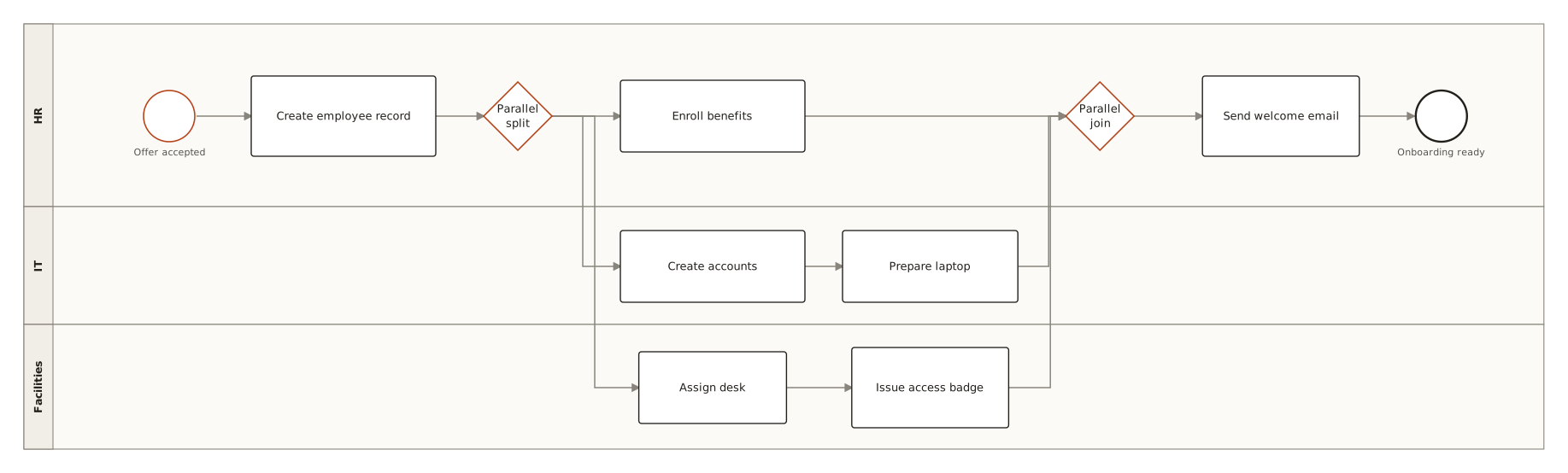
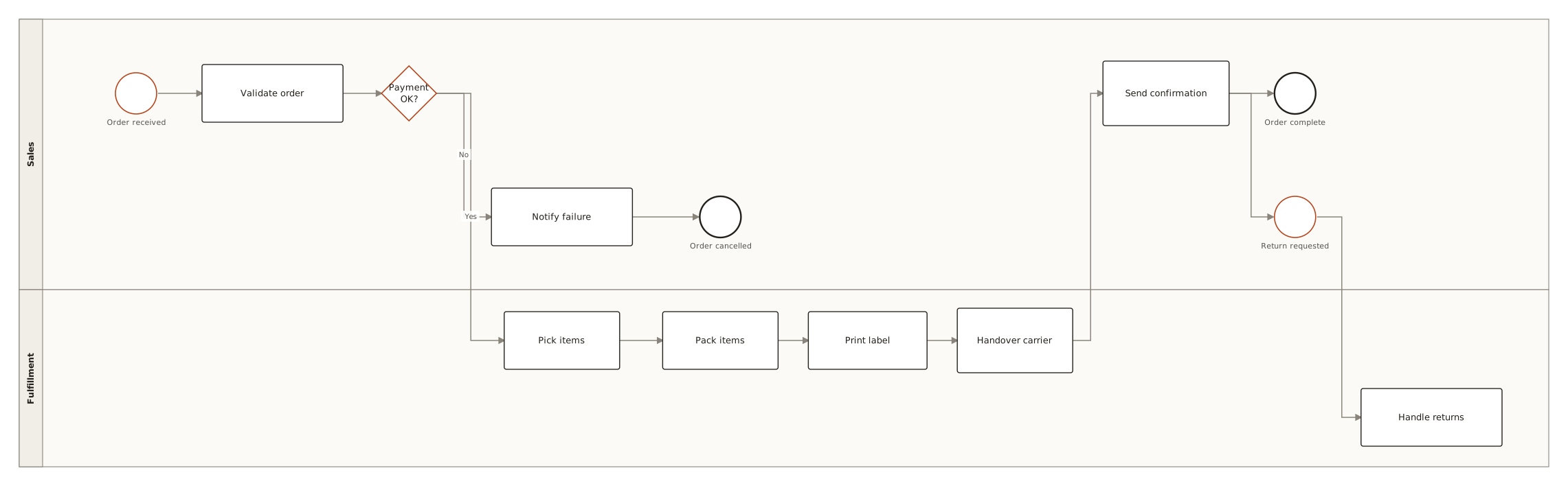
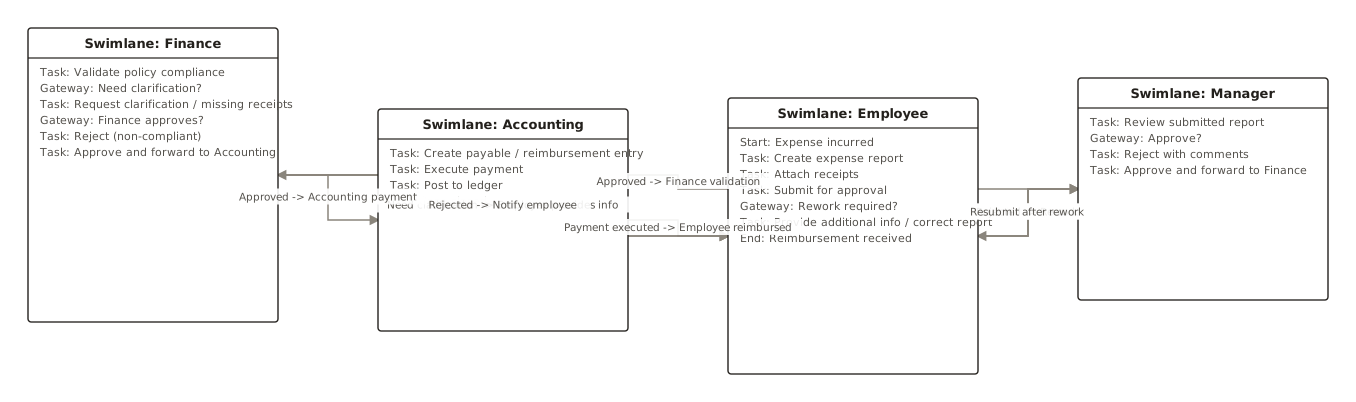
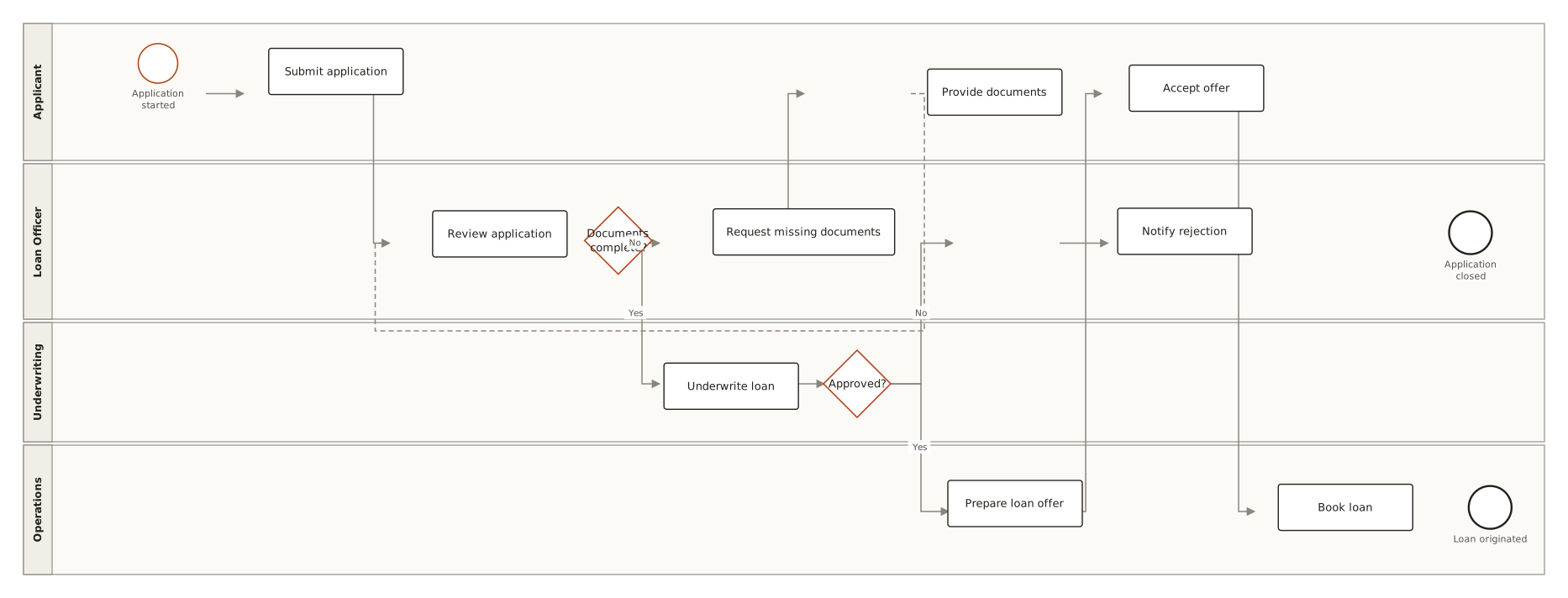
Live diagrams from the public ChartCraft gallery, each generated from a plain-English description — open one to see the prompt that produced it.
Questions
What are the basic BPMN symbols?
Events (circles), activities (rounded rectangles), gateways (diamonds), sequence flows (solid arrows), message flows (dashed arrows), pools and lanes (swimlanes), and artifacts such as data objects and annotations.
What is the difference between a start event and an end event in BPMN?
Both are circles. A start event has a single thin ring and begins the process; an end event has a single thick ring and finishes a path. An intermediate event has a double thin ring and sits in the middle of the flow or on the border of an activity.
What does the diamond with a plus sign mean in BPMN?
It is a parallel (AND) gateway. When splitting, all outgoing paths start at the same time; when merging, the process waits until every incoming path has arrived.
What does the diamond with an X mean?
An exclusive (XOR) gateway: exactly one outgoing path is taken, chosen by the conditions on the flows. A blank diamond means the same thing; the X is optional but recommended.
What is the difference between a sequence flow and a message flow?
A sequence flow (solid arrow) orders activities inside one pool. A message flow (dashed arrow with an open arrowhead and a small circle at the start) carries a message between two different pools. Sequence flows never cross pool boundaries.
What is the difference between a pool and a lane?
A pool is an independent participant with its own process, such as the customer or your company. A lane is a subdivision of a pool by role or department, such as Sales or Finance.
What is a boundary event?
An intermediate event drawn on the border of an activity. When it fires — a timer runs out, an error occurs, a message arrives — the flow leaves through the event. A solid ring interrupts the activity; a dashed ring lets it continue.
Who maintains the BPMN standard?
The Object Management Group (OMG). The current version is BPMN 2.0.2, published in December 2013; it is also ISO/IEC 19510:2013.