How-to
How to make a UML sequence diagram from a description
How to make a sequence diagram fast: describe who talks to whom and in what order, and ChartCraft draws the UML lifelines and messages.
Step by step
01Cast the participants
List who talks: the user, the browser, each service, the database. Order them left-to-right in the order they first speak — it keeps arrows flowing rightward.
02Start with the trigger
The first message is the event that kicks everything off: the user clicks Pay, the webhook arrives. Everything else is consequence.
03Follow the request chain
Walk the call down the line — storefront asks the order service, which asks the payment gateway. One message per meaningful hop, top to bottom in time order.
04Draw the returns that matter
Show replies that carry decisions (approved, declined, 404); skip the mechanical acks that add lines but no information.
05Add the failure branch
The happy path is half the story. Add the alt fragment for the declined payment or the timeout — then generate, refine in plain English, and export.
From sentence to sequence diagram, in three passes
Sequence diagrams grow rightward and downward: add participants as they join the conversation, add messages as the story continues. A password reset, in three passes.
Pass 1 · You type
The user asks the web app to reset their password. The app asks the auth service, which emails a reset link.
Participants appear left-to-right in speaking order. The whole first pass is just the request chain — who asks whom.
Pass 2 · You add
Before emailing, the auth service stores a one-time token in the database.
New participant, inserted where it first speaks. The token write happens before the email — sequence diagrams make ordering bugs visible precisely because time only flows down.
Pass 3 · You finish
The user opens the link and sets a new password; the service verifies the token and confirms.
The second half of the story reuses the same lifelines. The verify-then-update ordering is the security-relevant part — exactly what this diagram type exists to show. Export, or add the expired-token branch next.
Best practices — and the classic mistakes
Do
- Seven participants is the readability ceiling; merge minor ones (“Notifications”) or split the diagram.
- Name messages as the caller sees them: POST /orders, chargeCard(amount) — not internal function soup.
- Keep one scenario per diagram: “checkout, card declined” is a different diagram from “checkout, success” unless an alt fragment stays small.
- Let time read strictly downward — no arrows that jump back up.
- Start the diagram with the external trigger, not system internals.
Avoid
- Missing returns on calls whose replies drive the logic — the reader can't tell what was decided.
- Mixing abstraction levels: user clicks next to TCP handshakes.
- A dozen participants in one diagram — nobody can follow the arrows.
- Modelling state changes (“order becomes Paid”) — that story belongs in a state diagram.
The notation, in 30 seconds
Participants across the top, time flowing down, arrows for messages — the whole notation in five marks.
| Element | What it means |
|---|---|
| Participant / actor | A column in the conversation: user, service, database. Order them left-to-right by first involvement. |
| Lifeline (dashed vertical) | The participant's existence through time — messages attach to it. |
| Synchronous message (solid arrow) | A call that waits for an answer: POST /login, verifyPIN(). |
| Return (dashed arrow) | The reply flowing back: 200 OK, approval. Draw the ones that carry meaning. |
| Self-message | A participant doing internal work — validate, compute, retry. |
| Alt / opt fragments | Boxed regions for branches: the failure path, the optional step. |
Worked sequence diagram examples
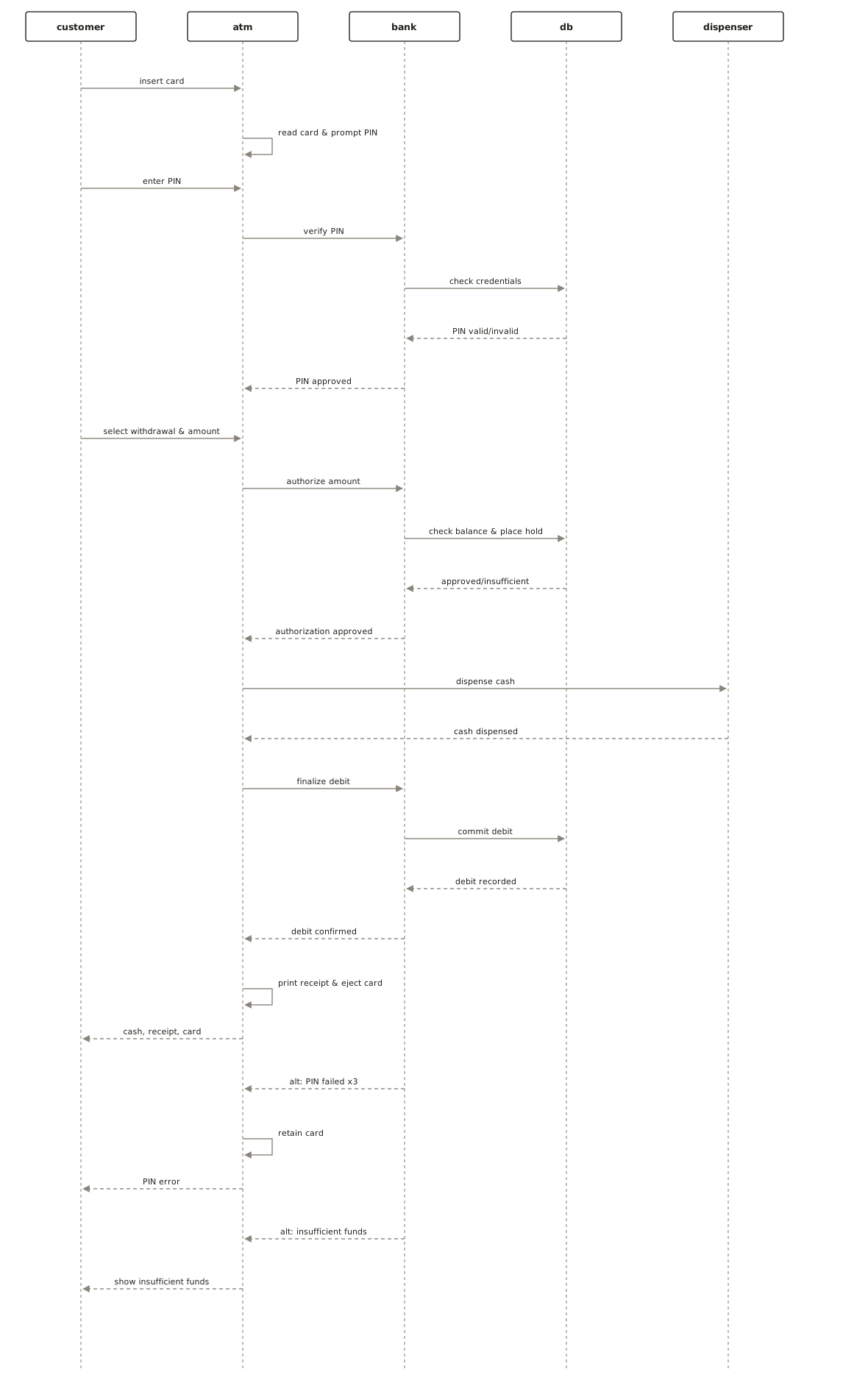
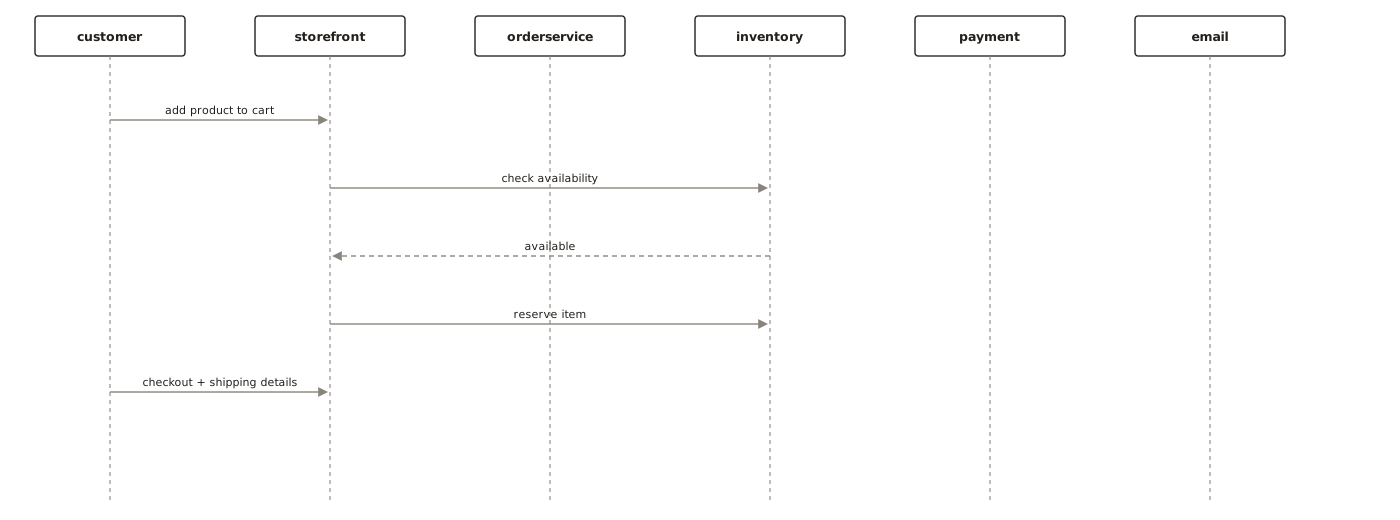
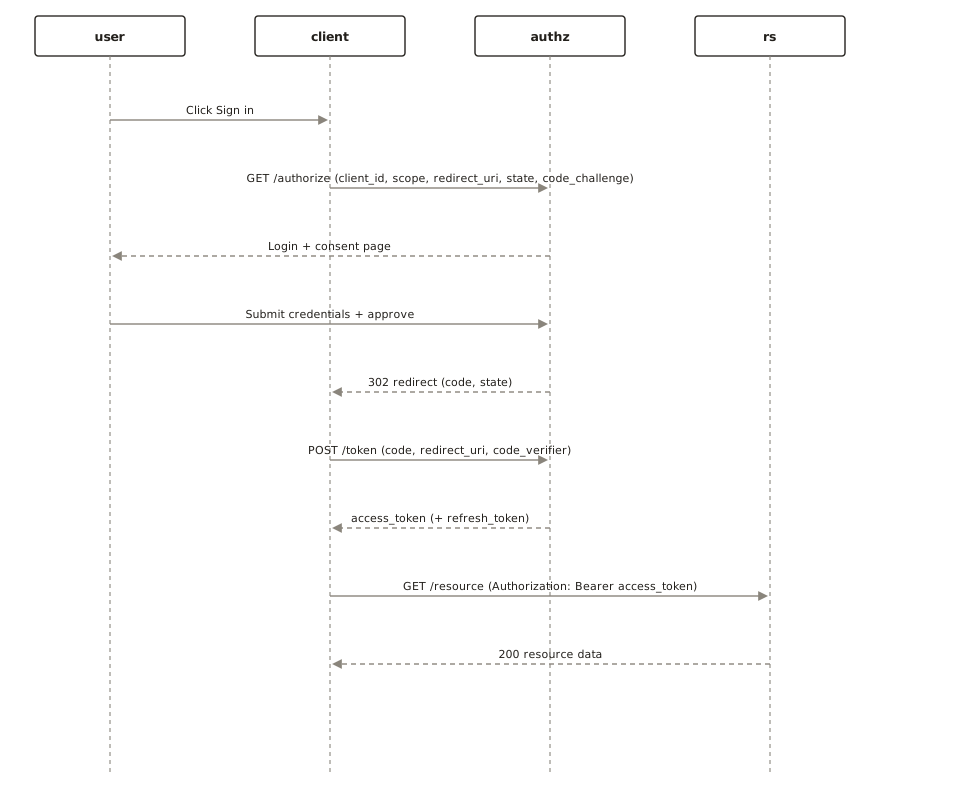
Generated with ChartCraft and published in the examples gallery — open one to see its prompt, or use it as a starting point.
Questions
What's the fastest way to make a sequence diagram?
Describe it in plain English. ChartCraft parses your description, builds the sequence diagram, and runs an automatic layout so you don't place or connect anything by hand.
Do I need to know any diagram syntax?
No. You write a normal sentence or two; ChartCraft handles the notation and layout.
When should I use a sequence diagram instead of a flowchart?
When the interesting question is who talks to whom — API flows, auth handshakes, service interactions. If the question is what steps happen, a flowchart tells it better.
How do I show error handling?
With an alt fragment: the top region holds the success branch, the bottom the failure (payment declined, token expired). If the failure path grows large, give it its own diagram.
Can I export the result?
Yes, export to SVG or PNG on any plan, including the free tier.